

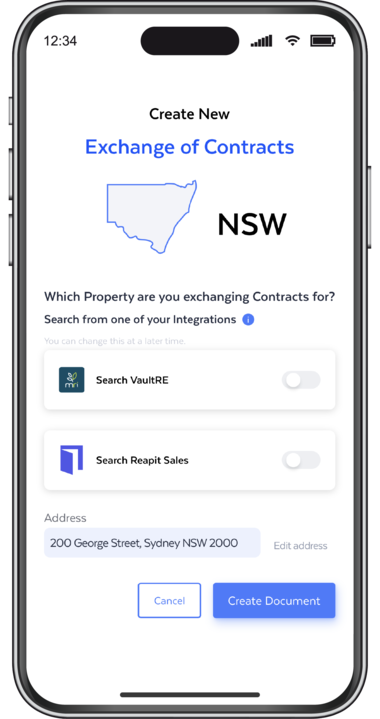

Exchange contracts with total control
Integrates With
Features and Benefits
Fast Delivery via Email & SMS
Send contracts via both channels to speed up turnaround times and avoid delays.

Smart Contract Templates
Get started faster with preloaded templates like Authority to Exchange. Add supporting docs with a single click.

Instant Contract Autofill
FLK automatically places buyer, seller and sales data into the correct fields—no manual formatting and no waiting on markups.

Attach Extra Docs
Include all supporting documents needed for execution so everything can be reviewed and signed in one smooth workflow.

Works on Any Device
Prepare, Send, sign, and exchange contracts from your phone, tablet, or desktop—wherever you are.

Auto-Notify & Audit Trail
Once signed, FLK automatically sends the contract to all parties—solicitors, conveyancers, and more —with a verified audit trail for complete peace of mind.
How it works
Your step by step guide to exchanging contracts:
Our Exchange of Contracts feature is built to simplify every step with smart automation and integrations with all leading sales CRMs.
Top agencies who are loving our Exchange of Contracts feature
“Using FLK for the exchange of contracts has completely streamlined our workflow. No printing, scanning, or chasing signatures.”
Rhys Pascale
Sales Executive
Stewart Maloney
Principal | Licensee | Sales Agent
Top agencies who are loving our Exchange of Contracts feature
"Using FLK for the exchange of contracts has completely streamlined our workflow. No printing, scanning, or chasing signatures."
"One platform. Endless efficiency.
We used to jump between a bunch of different tools, but FLK it over does it all.
We can edit PDFs, send and sign documents, and verify IDs — and the compliance is already built in. It’s streamlined everything for us from engagement through to exchange: fast, simple and secure.
And honestly, the best part is that we can do all of it straight from our phones. "

FAQs
FLK’s Exchange of Contracts feature allows agents to prepare, send, sign and exchange sales contracts digitally, all in one platform.
There’s no printing, scanning or emailing. The entire process, from contract creation to exchange, happens securely online.
The Exchange of Contracts feature is available to all NSW users with an FLK subscription.
It costs $20 per contract sent, not per contract uploaded, so you only pay for the contracts you actually sell.
No special software is required. FLK runs in your web browser on any device.
No downloads and no setup needed.
Yes. FLK supports SMS delivery to international numbers, so overseas clients will still receive their contract notifications.
Yes. You can upload your own contract PDF and FLK will detect the fields, place signatures automatically and allow you to edit or add extra fields as needed.
You can prepare, send, sign and exchange contracts on any device, including phone, tablet and desktop.
Yes. We send contracts for review and signing via SMS & email at the same time.
This makes it easy for clients to respond quickly, even when they’re on the go.
FLK integrates with major real estate CRMs to pull in property and client data automatically, reducing manual entry and speeding up contract preparation.
Supported platforms include VaultRE and Reapit Sales, with more being added.
Yes. You can attach supporting documents such as Authority to Exchange, Authority to Act and additional solicitor instructions. These can be included with the contract in just a few clicks.
No. Once all parties sign, FLK automatically sends the fully executed contract to all relevant parties, including solicitors and conveyancers.
No manual emailing required.
What is the Exchange of Contracts feature?
FLK’s Exchange of Contracts feature allows agents to prepare, send, sign and exchange sales contracts digitally, all in one platform.
There’s no printing, scanning or emailing. The entire process, from contract creation to exchange, happens securely online.
How much does it cost?
The Exchange of Contracts feature is available to all NSW users with an FLK subscription.
It costs $20 per contract sent, not per contract uploaded, so you only pay for the contracts you actually sell.
Do I need specific software or is it device-limited?
No special software is required. FLK runs in your web browser on any device.
No downloads and no setup needed.
4. Does it work if my client is overseas?
Yes. FLK supports SMS delivery to international numbers, so overseas clients will still receive their contract notifications.
5. Does it work with my existing sales contracts?
Yes. You can upload your own contract PDF and FLK will detect the fields, place signatures automatically and allow you to edit or add extra fields as needed.
6. What devices can I use to exchange contracts?
You can prepare, send, sign and exchange contracts on any device, including phone, tablet and desktop.
7. Can I send contracts via SMS or email?
Yes. We send contracts for review and signing via SMS & email at the same time.
This makes it easy for clients to respond quickly, even when they’re on the go.
8. What integrations does it support?
FLK integrates with major real estate CRMs to pull in property and client data automatically, reducing manual entry and speeding up contract preparation.
Supported platforms include VaultRE and Reapit Sales, with more being added.
9. Can I include supporting documents?
Yes. You can attach supporting documents such as Authority to Exchange, Authority to Act and additional solicitor instructions. These can be included with the contract in just a few clicks.
10. Do I still need to notify solicitors after exchange?
No. Once all parties sign, FLK automatically sends the fully executed contract to all relevant parties, including solicitors and conveyancers.
No manual emailing required.
Request your demo
free demo today!
See the difference FLK it over can make to you, your agency and your clients!
Our team will tailor your demo to your agency’s needs, demonstrating your state-specific documents and addressing your pain points. Our expert team will be in touch shortly to answer all your questions and arrange next steps.
You’ll be amazed at what you can do.